Strimzi kafka operator
Wraps the Strimzi operator chart, which runs and manages Apache Kafka (brokers,
ZooKeeper, topics, users, TLS) on Kubernetes via CRDs (Kafka, KafkaTopic, KafkaUser).
Why it's in KubeAid
Gives clusters a self-hosted Kafka option, provisioned and rotated declaratively (CRDs + sealed secrets)
instead of depending on a managed Kafka service. The chart also carries KubeAid-specific templates
(see templates/) for KafkaTopic/KafkaUser/ingress objects, driven from values.yaml.
Setting up the strimzi kafka operator
Configuration
The current ready-to-go configuration provided in the values file is the default configuration required to run kafka with tls enabled.
more configuration examples can be found in the examples folder
Install
- To install the kafka-operator locally in a cluster(f.ex minikube) go to the chart directory
argocd-helm-charts/strimzi-kafka-operatorand run the below command
helm install kafka-operator . -n default
- Once deployed ensure that all the CRDs (kafka, kafkaUser, kafkaTopic) and ingress(if enabled) are created
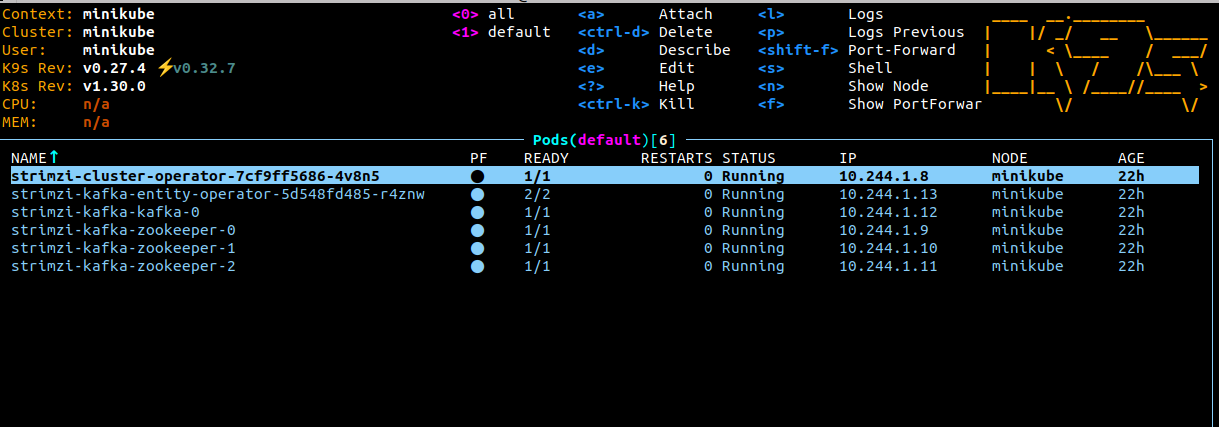
- After all the pods are created as shown below
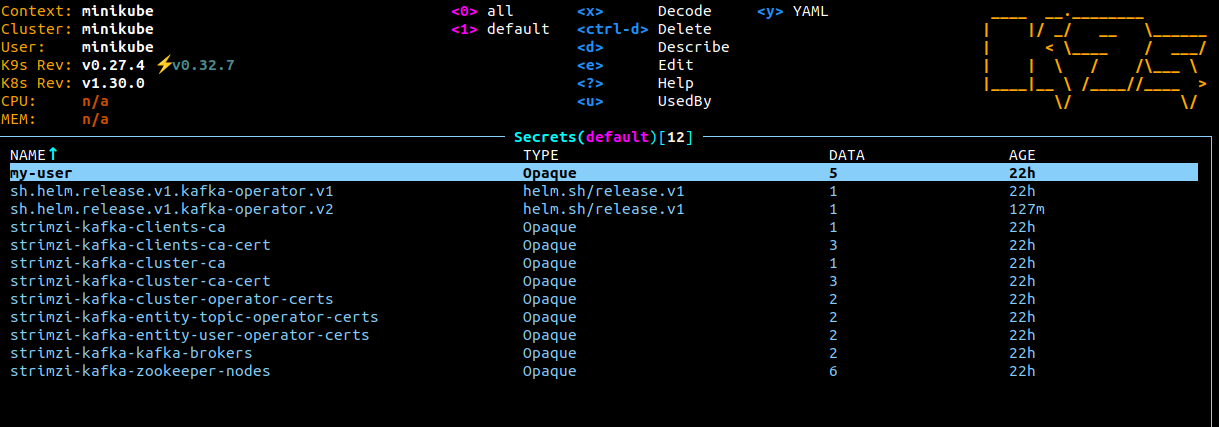
- Verify that the secrets which contain all the necessary certificates including kafka user certificate are created as shown below
Using confluent kafka go
- These steps are for the config provided in the default values file.
- If golang service is running outside the cluster, ensure that the
listeneris not of typeinternalin the config. - Repository - https://github.com/confluentinc/confluent-kafka-go/
Producer config -
TLS authentication -
p, err := kafka.NewProducer(&kafka.ConfigMap{
        "bootstrap.servers":                     "192.168.49.2:30486",
        "security.protocol":                     "SSL",
        "ssl.endpoint.identification.algorithm": "none",
        "ssl.ca.location":                       "/home/ananth/Desktop/kafka-local/ca/cluster.crt",
        "ssl.certificate.location":              "/home/ananth/Desktop/kafka-local/ca/user.crt",
        "ssl.key.location":                      "/home/ananth/Desktop/kafka-local/ca/user.key",
    })
ssl.ca.location-cluster.crtcertificate can be found in the secretstrimzi-kafka-cluster-ca-cert(required)ssl.certificate.location- client certificate stored in secret created forKafkaUser(required)ssl.key.location- client's private key stored in secret created forKafkaUser(required)"ssl.endpoint.identification.algorithm": "none"- for more info - https://github.com/confluentinc/librdkafka/issues/4349#issuecomment-1640196425 (required)security.protocol-SSL(required)bootstrap.servers-<internal/external IP>:<port>(required)
SCRAM-SHA-512 authentication -
p, err := kafka.NewProducer(&kafka.ConfigMap{
        "bootstrap.servers": "192.168.49.2:30263",
        "sasl.mechanisms":   "SCRAM-SHA-512",
        "security.protocol": "SASL_PLAINTEXT",
        "sasl.username": "my-user",
        "sasl.password": "UkPeaYQDJSnj1kLKVd96kXh9C60Mf6Uo",
    })
sasl.password- password found in the secret created forKafkaUser(required)sasl.username- username of theKafkaUser(required)sasl.mechanisms-SCRAM-SHA-512(required)security.protocol-SASL_PLAINTEXT(required)
Consumer config -
TLS authentication -
c, err := kafka.NewConsumer(&kafka.ConfigMap{
        "bootstrap.servers":                     "192.168.49.2:30486",
        "group.id":                              "my-consumer-group",
        "auto.offset.reset":                     "earliest",
        "security.protocol":                     "SSL",
        "ssl.endpoint.identification.algorithm": "none",
        "ssl.ca.location":                       "/home/ananth/Desktop/kafka-local/ca/cluster.crt",
        "ssl.certificate.location":              "/home/ananth/Desktop/kafka-local/ca/user.crt",
        "ssl.key.location":                      "/home/ananth/Desktop/kafka-local/ca/user.key",
    })
SCRAM-SHA-512 authentication -
c, err := kafka.NewConsumer(&kafka.ConfigMap{
        "bootstrap.servers":                     "192.168.49.2:30486",
        "group.id":                              "my-consumer-group",
        "auto.offset.reset":                     "earliest",
        "sasl.mechanisms":   "SCRAM-SHA-512",
        "security.protocol": "SASL_PLAINTEXT",
        "sasl.username": "my-user",
        "sasl.password": "UkPeaYQDJSnj1kLKVd96kXh9C60Mf6Uo",
    })
NOTE - Ensure that the KafkaUser has the required permissions for the resource group my-consumer-group.